LibreOffice broken color emojis on printing/PDF export
Could not print the document today: empty characters instead of emojis I use as an icons.
Exporting to PDF shows the same result: incorrect rendering of emojis.
LibreOffice supports PDF export from the command like. I've used Docker images to test different distros and versions.
- ArchLinux (LO 25.8.4.2 580 Build 2): tofu character
- Fedora 42 (LO 25.2.7.2-1.fc42): OK proper rendering
- Fedora 43 (LO 25.8.4.2 580 Build 2): blank character
- Ubuntu 26.04 (LO 25.8.4.2 580 Build 2): black-and-white printer emoji (different font)
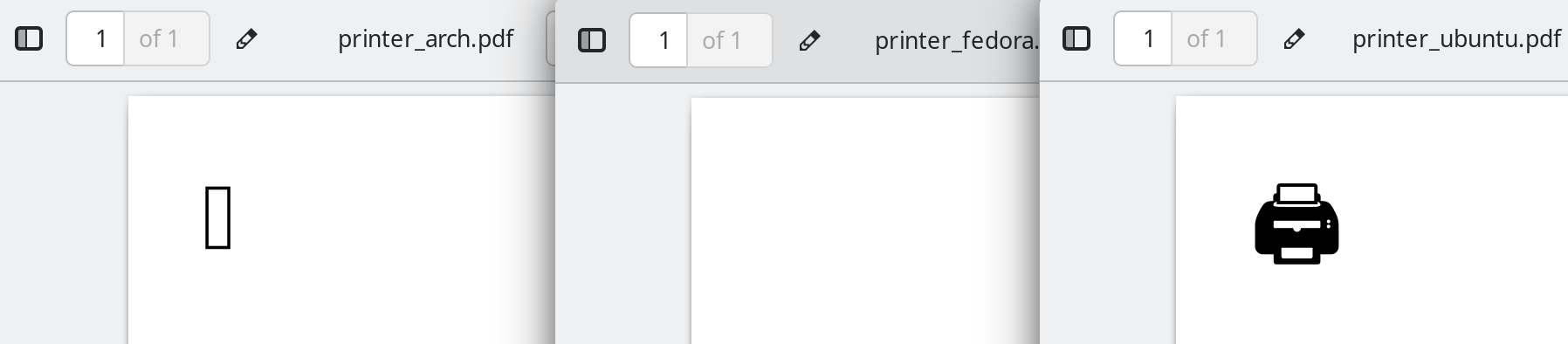
Debugging the issue
To quickly collect the data, I used Docker images of different distros: Arch, Fedora 42/43/44, (upcoming) Ubuntu 26.04:
cd temp/libreoffice-debug
docker run -ti --rm -v .:/data/:z fedora:44
In case of Fedora, docker is a link to podman.
The current directory inside the container would be mapped into /data, from which you can get the files and save into it.
I've created a sample document with a single emoji and run the following command in each distro container:
soffice --convert-to pdf source.odt
And checked the source.pdf contents.
Assuming the culprit
Since printing of emojis worked fine last year, the reason it stopped working could be one of the following:
- LibreOffice regression with update
- Font-related components regression (fontconfig, freetype)
- Emoji fonts
First I've tried to downgrade LibreOffice on my machine with dnf downgrade. Version 25.8.1.1-0.2.fc43 did not work exactly as the current 25.8.4.2-2.fc43, so it's not the application itself.
Then I've downgraded fontconfig and freetype, by manually picking the older version using Koji and installing it with dnf install https://…—did not work.
Downgrading the last component, the google-noto-color-emoji-fonts, did not work either.
However, installing google-noto-color-emoji-fonts manually in Ubuntu made it generate proper PDF files.
- Ubuntu 26.04 (LO 25.8.4~rc2-0ubuntu1): OK proper rendering
PDF contents
A bit later I've ended up debugging the contents of the PDF itself using pdf.hyzyla.dev.
In Fedora 42, the font inside PDF file contains images (XObjects of type Image) of emojis, however in Fedora 43 it's just a font, which I can't properly open in any font application (fontforge segfaults, opentype.js.org shows nonsense).
The font has been extracted from the PDF with MuPDF utility suite:
mutool extract source.pdf
which gave only .ttf files for the broken LibreOffice and a bunch of additional .png emoji images for the PDF generated on Fedora 42.
That's a drastic difference, but not a useful information as I don't know why does it differ and how does LibreOffice generate PDF: using external library or external implementation.
Debugging further
Finally, downgrading to google-noto-color-emoji-fonts to the version from Fedora 42 from Koji (20241008-2.fc42) fixed the issue.
As it listed in the package's update changelog, newer version of the packge has switched to COLRv1 emoji format,
processing of which is not supported by LibreOffice.
It still could be shown on screen, but not printed or correctly exported to a font subset used to embed it into PDF.
* Wed Apr 09 2025 Peng Wu <pwu@redhat.com> - 20241008-3
- Switch to use the COLRv1 font format
Result
I've reported the issue to LibreOffice developers, the messages from whom gave some hints on the debugging direction,
and to the RedHat bug tracker as a google-noto-emoji-fonts bug.
- https://bugs.documentfoundation.org/show_bug.cgi?id=170590
- https://bugs.documentfoundation.org/show_bug.cgi?id=168412
- https://bugs.documentfoundation.org/show_bug.cgi?id=151057
- https://bugzilla.redhat.com/show_bug.cgi?id=2436684
Workaround for Fedora 43
Downgrade google-noto-emoji-fonts:
sudo dnf install https://kojipkgs.fedoraproject.org//packages/google-noto-emoji-fonts/20241008/2.fc42/noarch/google-noto-color-emoji-fonts-20241008-2.fc42.noarch.rpm https://kojipkgs.fedoraproject.org//packages/google-noto-emoji-fonts/20241008/2.fc42/noarch/google-noto-emoji-fonts-20241008-2.fc42.noarch.rpm